
Pet medical records app for organized dog and cat care
Vet reports, lab results, vaccine cards, prescriptions, bills, and follow-up notes are easier to use when they live in one organized care history. Pawmi is a pet medical records app that keeps your dog's or cat's digital medical history clear, current, and ready for the next appointment.
Available on iPhone, Android, and the web — one account, synced everywhere.
What is a pet medical records app?
A pet medical records app helps store and organize vet reports, vaccination records, prescriptions, lab results, bills, weight notes, medication history, microchip details, and care notes for each dog or cat. The value is not just storage. The value is being able to find the right record, connect it to the right pet, and use it before a vet visit, emergency, boarding request, or follow-up.
When pet parents need records fast
These are the real-world moments where organized pet care information saves time and reduces guesswork.
- Emergency vet visits where allergy, medication, and recent lab context may matter
- Boarding or daycare intake that asks for vaccine proof and clinic details
- Grooming appointments that need rabies certificate or allergy notes
- Travel planning that requires current certificates or microchip information
- Switching vets and giving a new clinic a cleaner medical summary
- Insurance claims where invoices, prescriptions, and visit notes support the paperwork
Pet records worth keeping
Use this as a practical filter when deciding what belongs in your pet's long-term care history.
| Record | Keep this? | Why it matters | How Pawmi helps |
|---|---|---|---|
| Vaccination certificate | Yes | Facilities may ask for vaccine proof before boarding, grooming, daycare, or travel. | Save the certificate by pet and keep it near vaccine reminders. |
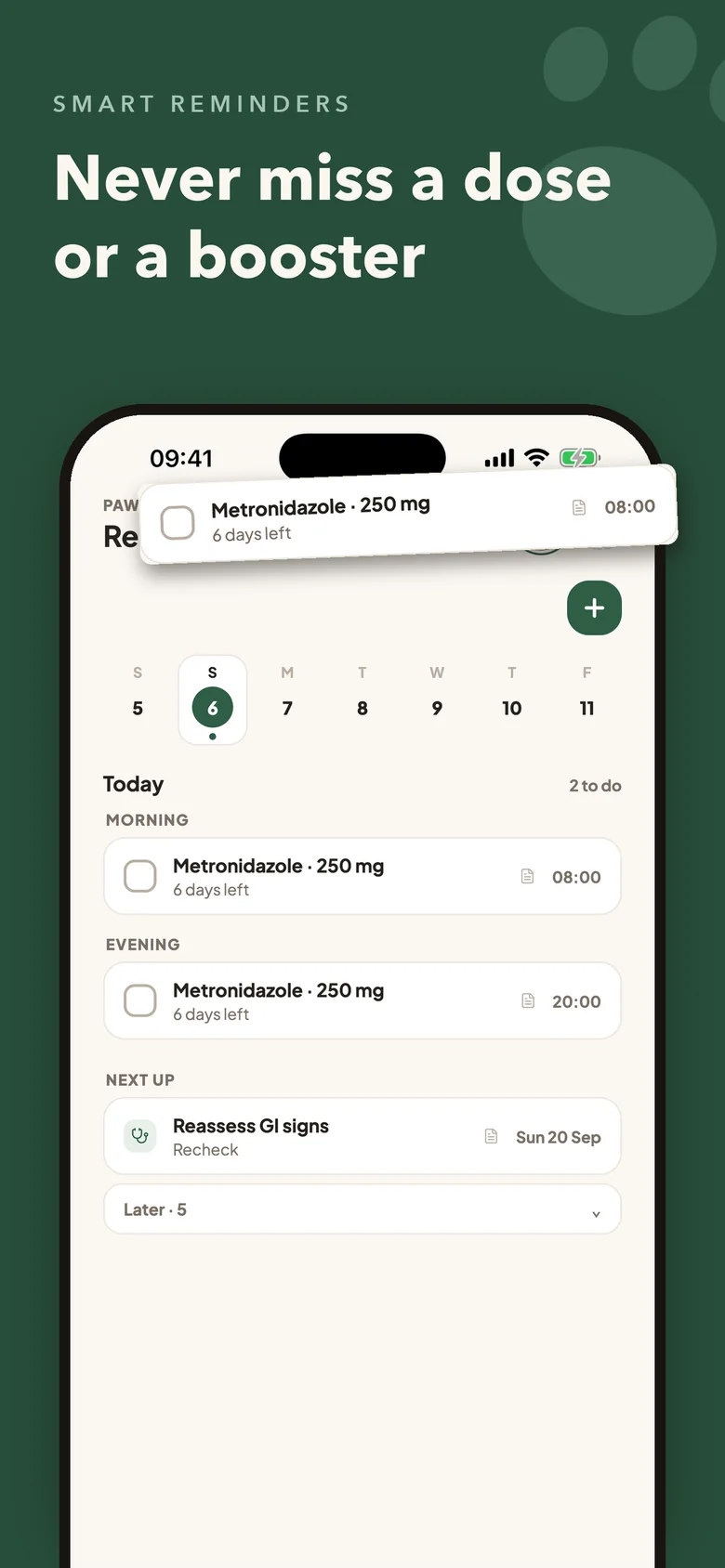
| Prescription | Yes | Medication names, doses, and course dates are hard to reconstruct from memory. | Pawmi reads each medication and dose, and saves a reminder per medication with the course days left. |
| Lab result | Yes | Labs can help show trends over time when a veterinarian reviews history. | Keep results in the pet's record list with dates and clinic context. |
| Invoice | Usually | Invoices can support insurance claims and sometimes explain services provided. | Store invoices beside the visit or record they belong to. |
| Microchip | Yes | Microchip details support identification, travel, and emergency handoffs. | Pawmi reads the microchip ID from records and can fill it into the pet's profile. |
| Allergy or medication note | Yes | These notes can be important when a new clinic or emergency team asks about risks. | Keep it as a dated Health Journal note on the pet. |
How do most pet parents manage records today?
Most pet parents do not start with a system. They start with whatever was easiest in the moment, and that is completely understandable.
- Vet PDFs stay buried in email
- Vaccine certificate photos sit in the phone gallery
- Prescriptions and discharge notes live in drawers
- Screenshots get shared in WhatsApp or family chats
- Lab reports sit in downloads with unclear file names
- Calendar reminders exist without the original record attached
Where does that record system break down?
The messy system works until you need speed. Search takes too long before appointments, reports get separated from due dates, multi-pet homes mix records, emergency moments need quick access, and memory fades. The result is a familiar pet-parent moment: you know the document exists, but you cannot find it when it would actually help. That is why a practical way to store pet records and share pet records with a vet matters.
What does a better pet record system look like?
A better system is simple enough to maintain on ordinary days and clear enough to use when care gets stressful.
Records are attached to the correct pet
Each dog or cat gets its own profile, so lab results, prescriptions, and visit notes never get filed under the wrong animal.
Documents and dates stay together
A vaccine certificate is only useful when you can see when it was given and when the next dose is due — Pawmi keeps both in one place.
Follow-ups and reminders connect back to the original instruction
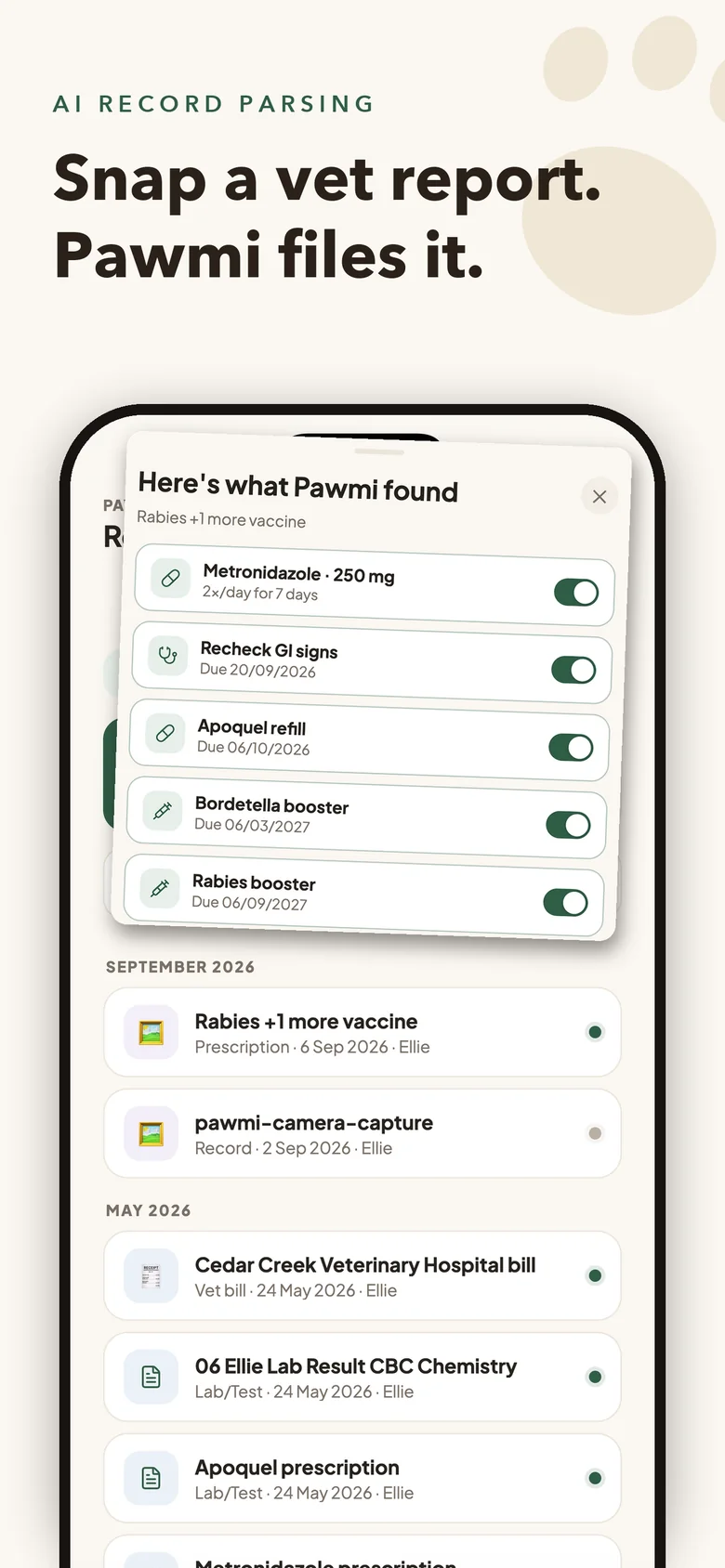
Reminders saved from a record carry a record marker, and each record shows what was saved from it — so the plan and the paperwork stay linked instead of scattered across old messages.
A clean care timeline shows what happened and when
Records sit in a per-pet list grouped by month, and filters for vaccines, lab tests, prescriptions, and vet bills narrow it down in seconds instead of flipping through folders.
Vet visits start with context instead of detective work
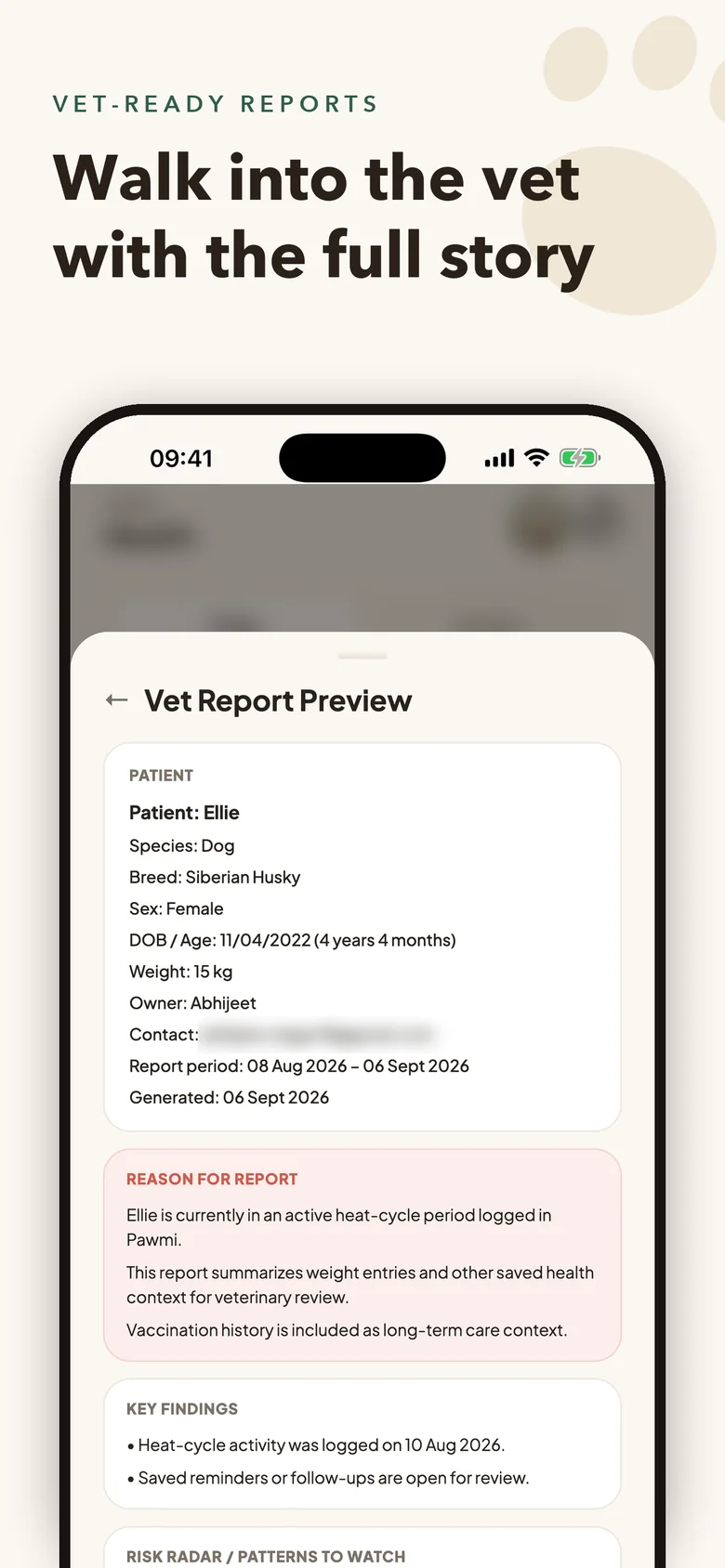
Walk into the clinic with a clear history — past diagnoses, current medications, and recent observations — ready to share on your phone.
How does Pawmi help organize pet medical records?
Pawmi turns scattered records into a pet-scoped care history. Snap or upload a vet report, lab result, prescription, or bill and Pawmi reads it — vaccines with due dates, medications with doses, follow-up visits, bill line items, even the microchip ID — and checks the document belongs to the right dog or cat, asking first if it looks like another pet's. A short "Here's what Pawmi found" sheet puts a switch on each item, and one tap saves the ones you keep as reminders; nothing is scheduled without your approval. Delete a record later and Pawmi shows the reminders and vaccines that came from it so you can remove them too. Pawmi does not diagnose pets or replace your veterinarian.
Pet Medical Record Checklist
Use this checklist as a practical template for what to collect and keep available.
- Vaccination history
- Lab results
- Prescriptions
- Medication courses
- Surgery or procedure notes
- Allergy information
- Weight history
- Microchip information
- Insurance or emergency info, if relevant
- Vet visit notes
- Invoices and bills
- Follow-up instructions
See Pawmi in action
Real screens from Pawmi 1.4.0 on iPhone, picked to match this guide.
Keep building a calmer pet care system
These related care guides cover the adjacent tasks pet parents usually manage in the same messy places.
Frequently asked questions
What records should every pet owner keep?
Keep vaccination history, lab results, prescriptions, medication courses, procedure notes, allergies, weight history, microchip details, vet visit notes, invoices, and follow-up instructions.
How long should pet medical records be saved?
Keep major medical records, surgeries, allergies, chronic condition history, and important labs for the pet's lifetime when possible. Ask your veterinarian before deleting records that may affect future care.
Can I digitize paper veterinary records?
Yes. A clear photo or scan can make paper records easier to access. Keep original documents when they are official certificates or when a clinic, insurer, or travel authority may require them.
What records should I bring to a new veterinarian?
Bring recent visit summaries, vaccine proof, lab results, medication details, allergy history, major diagnoses, procedure notes, and a short timeline of current concerns.
Can pet medical records help during emergencies?
Yes. Quick access to allergies, medications, diagnoses, recent labs, and clinic history can help you communicate more clearly during urgent care. Emergency decisions should still be made by veterinary professionals.
Should dogs and cats have separate records?
Yes. Each dog or cat should have a separate care history so vaccines, medications, weight notes, and visit records do not get mixed together.
Is Pawmi a replacement for a veterinarian?
No. Pawmi helps organize information and prepare care context. It does not diagnose, treat, or replace professional veterinary care.
Can Pawmi help organize records for multiple pets?
Yes. Pawmi keeps records, reminders, and health notes linked to the correct pet profile so multi-pet homes can stay clearer. The free plan covers one pet profile; Pawmi Pro supports up to three.
What happens if I delete a record in Pawmi?
Pawmi shows the reminders and vaccines that were saved from that record and lets you choose whether to remove them too, so nothing is left pointing at a document that is gone.
Is Pawmi available on iPhone?
Yes. Pawmi is on the App Store for iPhone, on Google Play for Android, and on the web at app.getpawmi.com, with one account synced across all three.
Make pet care easier to remember and explain
Snap a vet report, approve what Pawmi found, and keep the reminders, vaccine dates, and vet-ready context for every dog and cat in one place — without replacing professional veterinary care.
Available on iPhone, Android, and the web — one account, synced everywhere.